5 technical tips to make online classes irresistible
Improve the look and sound of your online classes.
Your students will enjoy them even more!
 admin timp
·
Reading time: 6 min.
admin timp
·
Reading time: 6 min.
28 April 2020
You have decided to offer online sessions through TIMP.
Great decision!
Great decision!
Now the important thing is that your services from home have the same touch of professionalism as when they were in person.
With your presence and know-how you have already won a lot, but there are other aspects to take into account as well.
With your presence and know-how you have already won a lot, but there are other aspects to take into account as well.
Since we are in audiovisual terrain, let’s review a few requirements that both the videos you send through your panel’s mailbox and the live sessions you schedule must meet.
Choose a room according to your activity
Before even placing the camera, the first thing to do is to decide where you are going to record or broadcast your session .
The first aspect of choosing the right place in your home is to know what your session is about and what resources you will use: if it is an English class, a room that can fit a table from which to teach it may be sufficient.
If your class also includes explaining concepts on a whiteboard, you will need space to place it.
If your class also includes explaining concepts on a whiteboard, you will need space to place it.
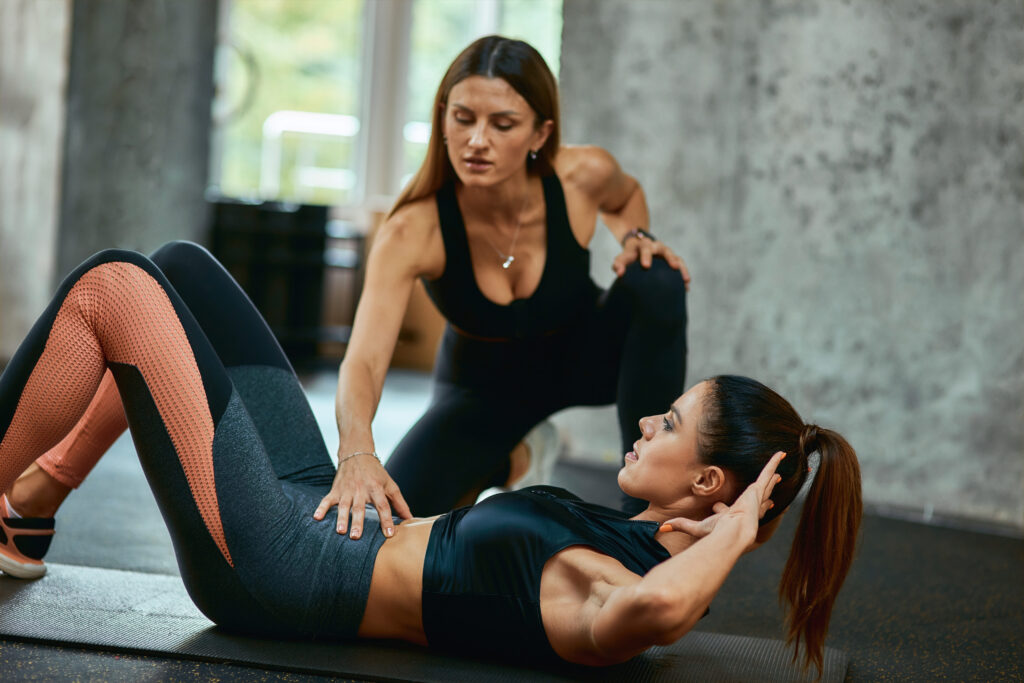
Your sessions are Pilates classes instead?
Then you will probably need more space: your living room may be the ideal place. You may have to remove some items of furniture such as the sofa, but this will give you more room to move around on the mat.
Then you will probably need more space: your living room may be the ideal place. You may have to remove some items of furniture such as the sofa, but this will give you more room to move around on the mat.
In short, to choose the location of your class, be clear about the sections your session will consist of and the space you will need to develop them.
Take care of the lighting
Light in any recording or live session is fundamental.
Obviously it will depend a lot on the time you record, but ideally it should be during the day: in a home there is no better light at hand than that provided by the sun.
If it enters very directly, try to use translucent curtains that soften the total light that illuminates the room.
Obviously it will depend a lot on the time you record, but ideally it should be during the day: in a home there is no better light at hand than that provided by the sun.
If it enters very directly, try to use translucent curtains that soften the total light that illuminates the room.
Above all, avoid placing the window against the light, i.e. in front of the camera, otherwise your image will be completely shadowed and no matter how much you work on the contents of your session, the final finish will look rough and improvised.
On the other hand, if you have to broadcast at dusk or at night, try to avoid halogen ceiling lamps, which project light in a very concentrated way and generally from above, creating very harsh shadows that disfigure the whole.
If you have no other option to illuminate the whole room, try to soften the shadows of the halogen spotlights with a front support light that specifically illuminates you, such as a floor lamp.
If you have no other option to illuminate the whole room, try to soften the shadows of the halogen spotlights with a front support light that specifically illuminates you, such as a floor lamp.
Capture the best picture and sound
A better camera generally offers better image quality, but it is not the key factor.
More important than the quality of the camera (if we start from an acceptable minimum) is the configuration of the camera’s recording parameters.
More important than the quality of the camera (if we start from an acceptable minimum) is the configuration of the camera’s recording parameters.
There are a few that you could adjust (white balance, ISO and shutter speed…), but unless you are using an SLR/DSLR camera and considering that you are probably not in the imaging world, it is best to go into the different preset modes offered by your mobile camera or webcam and select the scene mode that best meets your needs.
To do this, do a test before the online session by recording yourself for one minute as if you were teaching a class and verify that it captures your movement, as well as the colors and light of the room.
As for the sound, it is important to reduce as much as possible the reverberation or echo of the room where you record your session.
If it is a room with furniture, it will absorb part of the sound and you will avoid that annoying echo.
On the other hand, if it is an empty room, you should look for another location or, if it is not possible, add some elements to help you reduce the reverberation of your voice, such as carpeting on the floor and some furniture covering the corners, which are usually the corners where the sound bounces more easily.
If it is a room with furniture, it will absorb part of the sound and you will avoid that annoying echo.
On the other hand, if it is an empty room, you should look for another location or, if it is not possible, add some elements to help you reduce the reverberation of your voice, such as carpeting on the floor and some furniture covering the corners, which are usually the corners where the sound bounces more easily.
If you can, use a lapel microphone.
They are tiny and you can clip them at chest height on your shirt or on your shirt lapel, hence the name.
It will pick up your voice very close to your mouth, so the sound will register very clearly and the echo level will be much lower.
They are tiny and you can clip them at chest height on your shirt or on your shirt lapel, hence the name.
It will pick up your voice very close to your mouth, so the sound will register very clearly and the echo level will be much lower.
Correctly position the camera
The way your users will see you is very important for them to follow you with interest.
Therefore, be sure to position the camera correctly, neither too high nor too low with respect to your eye level.
And as far as distance is concerned, put it far enough away from you so that they can follow you comfortably, i.e. not too far away and not too close.
Going back to the example we have seen above, if you teach pilates you will have to put it far enough away so that they can see your whole body, but if you teach English, if you can be seen from the torso up, it might be enough.
Going back to the example we have seen above, if you teach pilates you will have to put it far enough away so that they can see your whole body, but if you teach English, if you can be seen from the torso up, it might be enough.
As a basic rule of thumb think about this: if a random client were in front of you, how would they be able to follow your directions properly? Try to replicate their point of view when positioning the camera.
Edit your video classes
When a session is live, there is no catch: what happens is in real time, so prepare your class well and let yourself go when you teach it.
The important thing is naturalness.
The important thing is naturalness.
From a sound system you can play pleasant music in the background to accompany your session but without distracting, very useful to fill empty spaces of content such as those that occur when you must be absent for a few seconds or take the opportunity to prepare some support element for the class.
But if you also do video classes (recorded), things change.
These classes are the ones you record and edit to send later.
They can even be live classes that you then send edited via the TIMP mailbox or share on your social networks.
These classes are the ones you record and edit to send later.
They can even be live classes that you then send edited via the TIMP mailbox or share on your social networks.
In this case, the best thing to do is to edit your video and take advantage of it to add a header that gives way to the content, overprinted text that separates the different sections of the class and music added afterwards to disguise the cuts that you have been making in the editing.
For example to eliminate “empty” moments in which nothing happens.
For example to eliminate “empty” moments in which nothing happens.
This will give the final video a more cohesive and dynamic finish.
Don't fall behind!
We want to be the push you need to take your business to the next level. Are you in?
I want a free demo call!